Table of Content
- How to Reset forgotten Password on Windows XP
- Your question: How do I bypass Windows XP Professional administrator password?
- How to Bypass Windows XP Password
- Method 1. Reset Windows XP Forgotten Password in Safe Mode
- ★ Method 2 of 2: Using Windows Password Rescuer to Bypass Windows XP Logon Password
- Laptop Password Tips
- How do I reset Windows XP without password or CD?
Then the password should be reset. In the pop-up window, locate the following path via the left navigation bar. Then right click your user account and select Set Password, and follow the on-screen instructions to reset the admin Windows XP password. A lot of users have forgotten admin password Windows XP. How to reset Windows XP password? If you are one of them, this post of MiniTool is what you need.
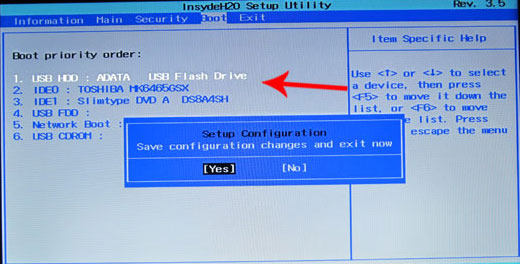
How to recover or reset Windows XP password so you can then get back into your system? There are lots of options to recover it nowadays but almost all of them require a set of special skills to get it work. In this article I'll show you 2 simple ways to help you recover Windows XP password in the event that you forgot the administrator password or Windows account was locked out. You can also reset your forgotten Windows XP password with an installation CD or DVD. If you have the CD with you, it might come in handy because it will help you reset the password.
How to Reset forgotten Password on Windows XP
You should choose Safe Modeand hit Enter. Have a system repair disc? Go here How to Reset Your Windows User Password With System Repair Disc.
This way always works as long as you never change the built-in administrator account with blank password. Once you get back to your Windows with the administrator account, you are able to change the current but forgotten password. With a new one for your original account, you can log back in to the Windows as usual. Right-click the user account that you forget administrator password Windows XP and select Set Password.
Your question: How do I bypass Windows XP Professional administrator password?
Download, install and launch the Windows Password Recovery Tool on an accessible computer. Ophcrack is a free Windows password cracker and can bypass Windows XP password depended on rainbow tables. It is an effective execution of rainbow tables done by the creators of the technique.

As a result of this, your computer will become unstable every time and waste our time! Therefore most of new operating systems now comes with a rolling-back module with their OS to treat these corrupted system files and get into our previous status easily. Microsoft Windows XP also provides a similar program to restore your system without any difficulty. But the most significant and funniest thing is we can use this simple repair program to bypass our windows password through a big security hole in this module. First prepare your genuine Windows XP bootable disk, put in to your CD Rom and restart your computer. Yes, you can bypass the Windows XP login password even if you do not have a Windows password reset disk or a system repair disc.
How to Bypass Windows XP Password
Now you just need a few clicks to bypass the administrator password. Place your Windows XP installation CD in the CD drive and start the computer. If you receive the message “Press any key to start from the CD”, then press any key.

If you can’t open the Computer Management window via the account, you can try using remote access instead. Here you need to use a different computer (it doesn’t have to be Windows XP, but must be a Windows system). Make sure to connect to the same network. Boot your computer to load the Welcome screen, and press Ctrl + Alt + Deletekeys altogether twice to load the user Login screen.
If you have no home screen, type Administrator and leave the password field as blank. If you can't log in as you have ever changed the password, please refer to Method 2 to recover Windows XP password. On Windows XP, there is a hidden account named Administrator. Most of the time, this account has no password set.

If it doesn’t work, then type in “Administrator” in the username box and again click on “OK”. The files that are being installed appear in the lower left part of the screen. When you see that you are installing the ‘Devices’, press SHIFT + F10. A command console will open. When it restarts, DO NOT start the CD, let it enter the operating system, where it will continue with the recovery of the system.
You will get the home screen in your display and you need to choose “Administrator”. If you don’t get the home screen, just type in “Administrator” and leave the password box empty. You should be able to log into your computer if you haven’t already changed the password. Bypassing Windows XP startup password will require you to follow the steps we have provided in the article.
Simply turn on your PC and wait some seconds until you see user login screen. After your computer came to login window, just hit "ALT", "CTRL" and "DEL" keys on your keyboard at the same time twice. Then you will immediately see another old classic style login window on your computer screen.
Then boot the locked computer from password reset disk. Insert an empty USB or CD/DVD into the computer, select the corresponding disk from drop-down list, then click on “Begin Burning” button to start burning a password reset disk. Reboot the computer into Safe Mode. Once you’ve logged into the Administrator account open Control Panel and User Accounts.